Disability Insurance

Disability Insurance can help protect your clients by providing replacement income if they're unable to continue working. You can enter the Benefits and Premiums associated with these policies in Snap to help with client discussions.

1

Add the Insurance Policy

To add a new insurance policy, navigate to Scenario Setup -> Insurance and then click the Add Disability Insurance Policy button.

Enter the details under each column, and the row will be automatically saved when complete:

  1. Start by entering a Description. It will appear as a column header on the Planning Page and in Client Reports

  1. The Insured person will default to the Client or Spouse selected in the top-left corner of the page.

  1. Under the Coverage From Age column, you can update the default age (which is the age the individual reaches by the end of the first year of the projection). You can enter a new age, or select the gear icon to enter a specific year, month, and day that coverage starts.

  1. Similarly, under the Coverage To Age column, you can update the default age, which is 65. You can enter a new age, or select the gear icon to enter a specific year, month, and day that coverage ends.

  1. The Annual Benefit and Annual Premium are not displayed under the Insurance table because they can change over time. To enter, view, or edit these values, click Edit under either column.

    This produces a pop-up window where you can enter the details or copy and paste from Excel:

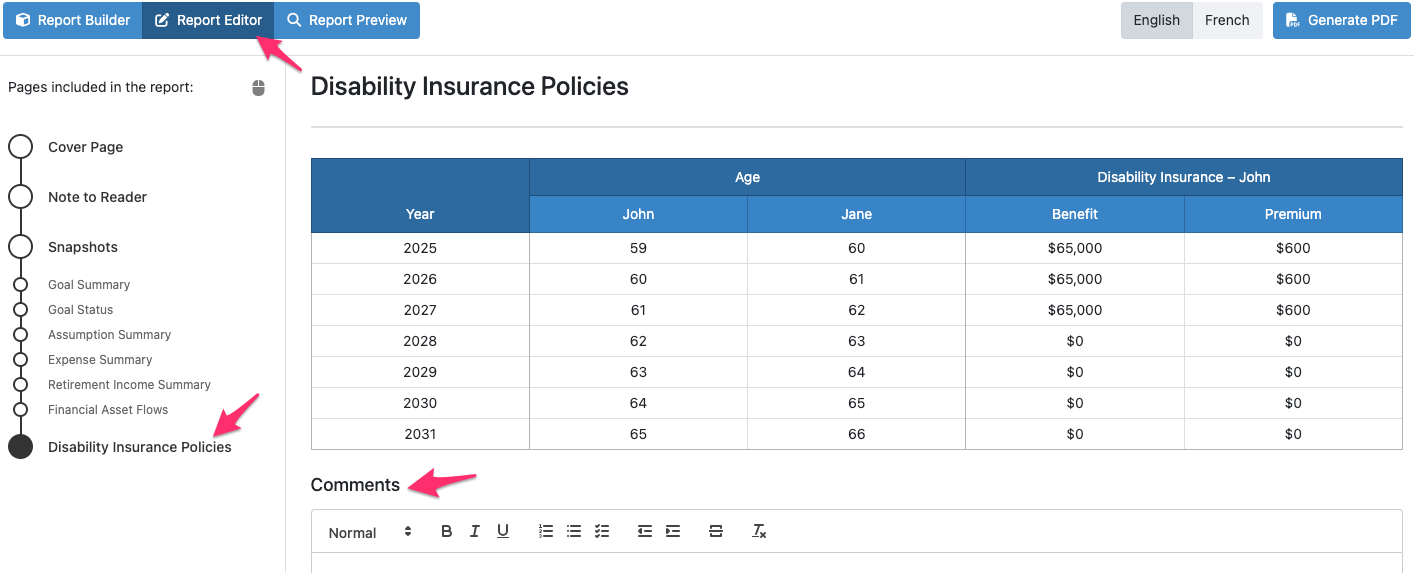
You can record additional details about the policy such as renewal provisions or riders (e.g., return of premium) in the Notes section by selecting the page icon under Actions. Notes added here will not appear anywhere else. For your clients, you can add Comments on the Disability Insurance Policies page of the Client Report.

You can Copy or Move the policy to the spouse by clicking the circle with the white arrow icon (green will create a duplicate copy and blue will move the existing policy).

To delete the policy, click the trash can icon under Actions.

2

Disability Insurance policies on the Planning Pages

Once the policy has been entered, the Annual Benefit and Premiums will be displayed under the Disability Insurance section. Toggle between the collapsed and expanded views of the section to view individual policies or total amounts.

  • The Annual Premium amounts are subtracted from the insured client's cash flow and should not be included in the Base Expenses amount.
  • The Benefit is available for reference and discussion purposes but doesn't impact the cash flow of the projection.

3

Insurance in the Client Report

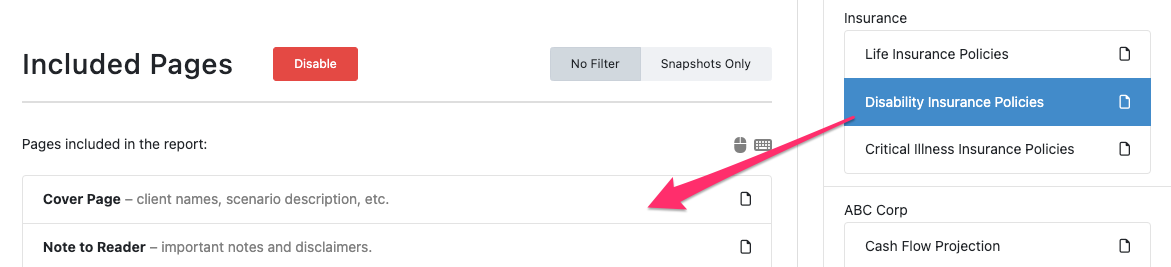
In the Client Report -> Report Builder, select Disability Insurance Policies under the Gallery and drag and drop this page under Included Pages if it has not already been included.

In the Report Editor, you can view the policy details and add comments if desired.

Still need help? Contact Us Contact Us